msol

Microsoft 365 on Linux, one window per app.

msol opens Word, Excel, Outlook, Teams and the other Microsoft 365 web apps in windows of their own, each with its own taskbar entry and icon, just like installed apps. Sign in once and every app is signed in, and you stay signed in after a restart.

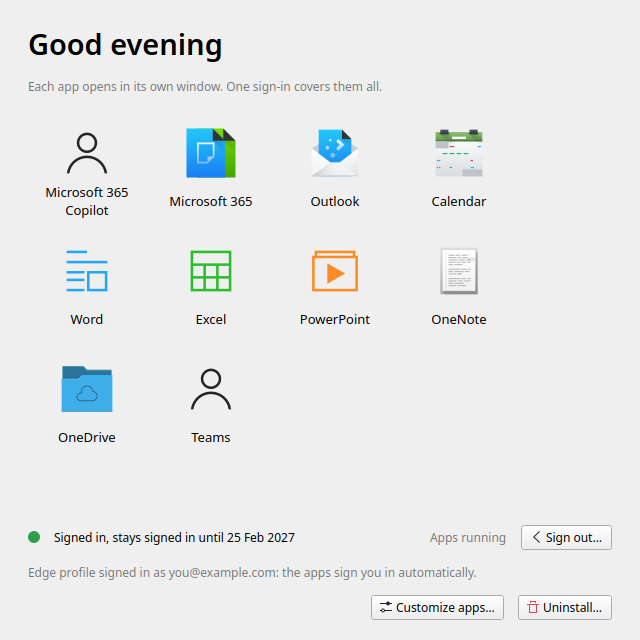
The msol launcher: app tiles for Microsoft 365 Copilot, Outlook, Calendar, Word, Excel, PowerPoint, OneNote, OneDrive and Teams, with the sign-in status below.

Feels like installed apps

The apps are Microsoft's own web apps. msol is the small layer around them that makes them behave like desktop software on KDE Plasma.

A window per app

Every app gets its own window, taskbar entry, title-bar icon and menu entry. Alt+Tab between Outlook and Word like on any desktop.

Sign in once

All apps share one dedicated Edge profile, so one sign-in covers them all, including work accounts with multi-factor sign-in.

Stays signed in

Close every app or reboot: you are still signed in next time. The guided sign-in sets up Edge's automatic sign-in for work accounts.

Sharp on Wayland

Apps run natively on Wayland, so text stays crisp with fractional scaling and the GPU drivers of your system are used.

Links open as apps

Open Excel from Outlook's app menu and it opens as the Excel app window, not as a browser tab.

Pick your apps

Office apps are shown by default; add SharePoint, Loop, Planner, Power BI, Viva and more, with generic or official icons.
Install

For Debian, Ubuntu, Kubuntu and KDE neon with KDE Plasma 6 on Wayland.

  1. Download the packageGet msol_<version>_all.deb from the latest release.
  2. Install it
    sudo apt install ./msol_*_all.deb
  3. Open “Microsoft 365 Launcher”from your application menu. On first start it offers to download Microsoft Edge for msol (about 170 MB, straight from Microsoft, signature-checked) and creates a menu entry per app.
  4. Sign inClick Set up automatic sign-in… and follow the steps. After that, every app opens signed in.

Prefer the source? Clone the repository and run ./msol edge-install, then ./msol install. See the README.

Questions

Why isn't Microsoft Edge included in the package?
Microsoft does not allow redistributing Edge. msol downloads the official package from packages.microsoft.com for each user, checks Microsoft's signature and checksums, and unpacks it in your home folder. It adds no apt repository and needs no administrator rights. Update it with msol edge-update.
Does it touch my normal browser?
No. msol uses its own Edge profile, separate from any Edge or other browser you use, and never syncs your everyday profile into it.
Where is my password stored?
msol never sees it. You sign in on Microsoft's own pages inside Edge, and the sign-in stays in the Edge profile on your computer (~/.local/share/msol/edge-profile).
Does it work on GNOME or other desktops?
msol is made for KDE Plasma: separate taskbar entries, title-bar icons and clean closing use KDE's window manager. Other desktops are not supported yet.
How do I remove it?
In the launcher, choose Uninstall… → Remove everything (or run msol uninstall --all), then sudo apt remove msol.